
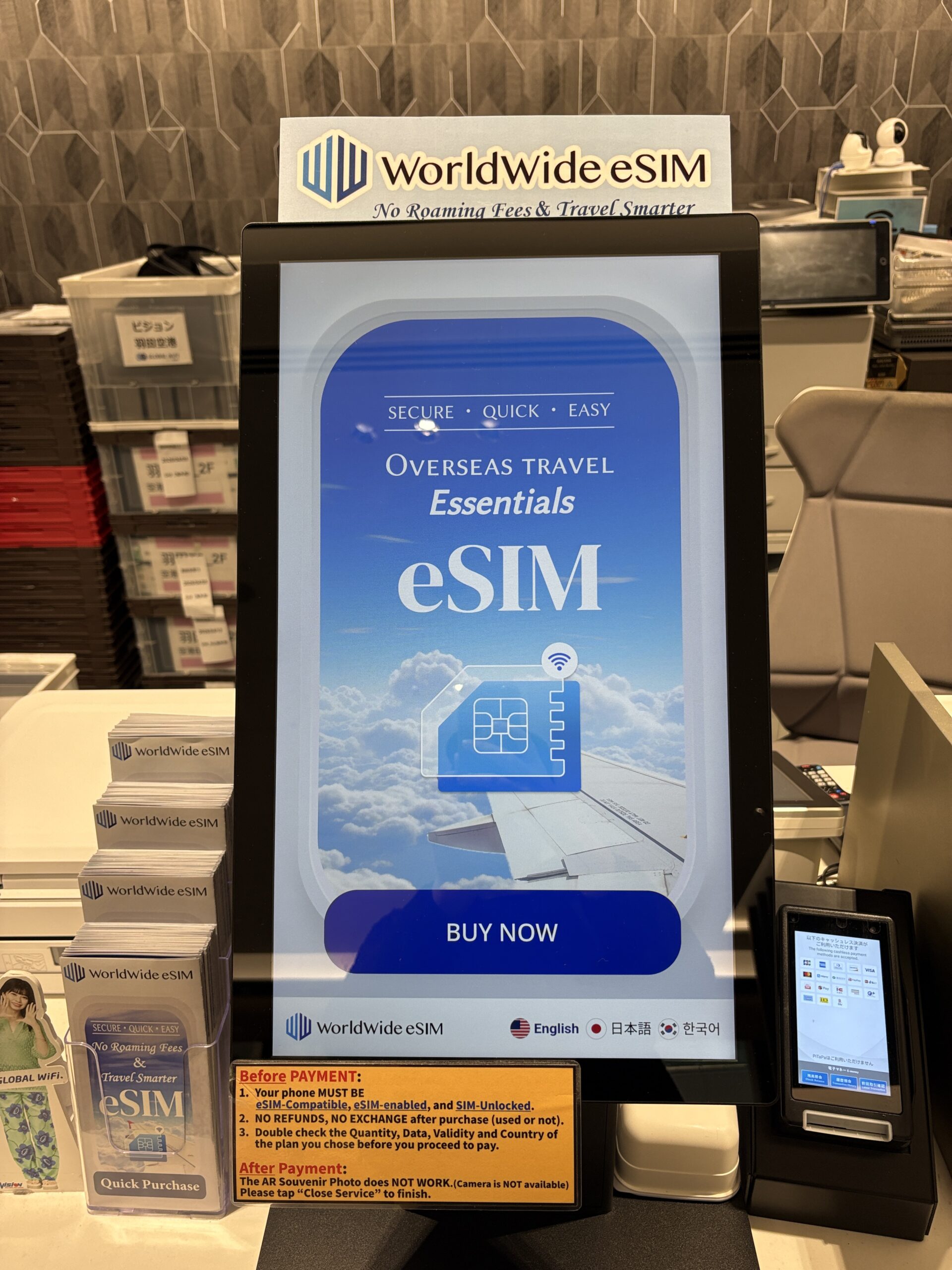
I have been arriving and departing through Japanese airports for more than twenty years, and I have watched as prices for phone data has changed dramatically in both form and price over the years. On my last trip through Haneda, I stopped and photographed every price advertised at the counter, then lined them up against what you can pre-order online before you fly. Here is exactly what each option costs in 2026, and which one I actually use.
By Tokyo Becky
Cheapest way to stay connected: an eSIM that you purchase in advance, from around US$3.99 (roughly ¥600) for 1 GB.
Easiest option: an eSIM you install before you fly, which goes live the moment you land at Narita, Haneda, or Kansai.
Best for heavy users: an unlimited eSIM, such as Saily Unlimited (15 days for US$48.99, about ¥7,300), giving 5 GB per day at full speed.
Airport pocket WiFi rental: ¥1,500 to ¥1,800 per day for unlimited data, plus a deposit and a return trip to the counter.
Airport eSIM kiosk (WorldWide eSIM at Haneda): from ¥800 for 3 GB / 1 day up to ¥15,000 for unlimited / 30 days.
One firm requirement: your phone must be eSIM-compatible and carrier-unlocked. If it is not, you need a physical SIM or pocket WiFi instead.
The cheapest and least stressful option is to buy your eSIM online before you leave home, so it activates automatically when you land. I use Saily: plans start at US$3.99, it works on Japan’s major networks, and setup takes about a minute. No line at the counter, no deposit, no scramble for Wi-Fi at arrivals.
What are my options for staying connected in Japan?
When you land in Japan, you have four realistic ways to get online at very different price points. Three of them are sold right at the airport arrivals counter, and one you arrange before you ever leave home.
The four options are: pocket WiFi rental (a small hotspot device you carry and return), a physical SIM card (you swap your home SIM for a Japanese data SIM), an airport eSIM bought at a kiosk (a digital SIM you buy and scan on the spot), and a travel eSIM you pre-order online (the same digital SIM, but purchased before your trip). For most travelers in 2026, the best eSIM for Japan is the one you set up before you fly, and the prices below show why.
To compare everything fairly, I have kept every Japanese price in yen as photographed, and added an approximate US dollar figure at roughly ¥150 to the dollar, the rate through mid-2026. Exchange rates move, so treat the dollar figures as a guide but note that things will change.
How much does pocket WiFi rental cost in Japan in 2026?
Pocket WiFi is a pocket-sized hotspot that several phones and laptops can share. It is the right choice if you are traveling as a family or group, or if your phone cannot take an eSIM. The catch is that you rent it, pay per day, and have to return the device, and most counters push an insurance plan on top.
These are the daily rates from the rental board at the Haneda counter, on the “Full Plan” that includes insurance. Longer rentals are discounted, saving up to 40 percent on a month-long hire.
| Pocket WiFi plan | Per day (Full Plan, insured) | 30-day total | Notes |
|---|---|---|---|
| 600 MB / day (4G) | ¥1,100 | ¥19,800 | Light use only |
| 1 GB / day (4G) | ¥1,300 | ¥23,400 | Maps and messaging |
| 3 GB / day (4G) | ¥1,400 | ¥25,200 | Comfortable daily use |
| 4G Unlimited | ¥1,500 | ¥27,000 | About US$180 for a month |
| 5G Unlimited | ¥1,800 | ¥32,400 | About US$215 for a month |
A “Without Plan” option drops the insurance and accepts card payment only: ¥770 for 600 MB/day, ¥970 for 1 GB/day, ¥1,070 for 3 GB/day, ¥1,170 for 4G unlimited, and ¥1,470 for 5G unlimited. Read the small print before you sign: the loss, damage, or breakage surcharge on a full pocket WiFi set is around ¥30,000.
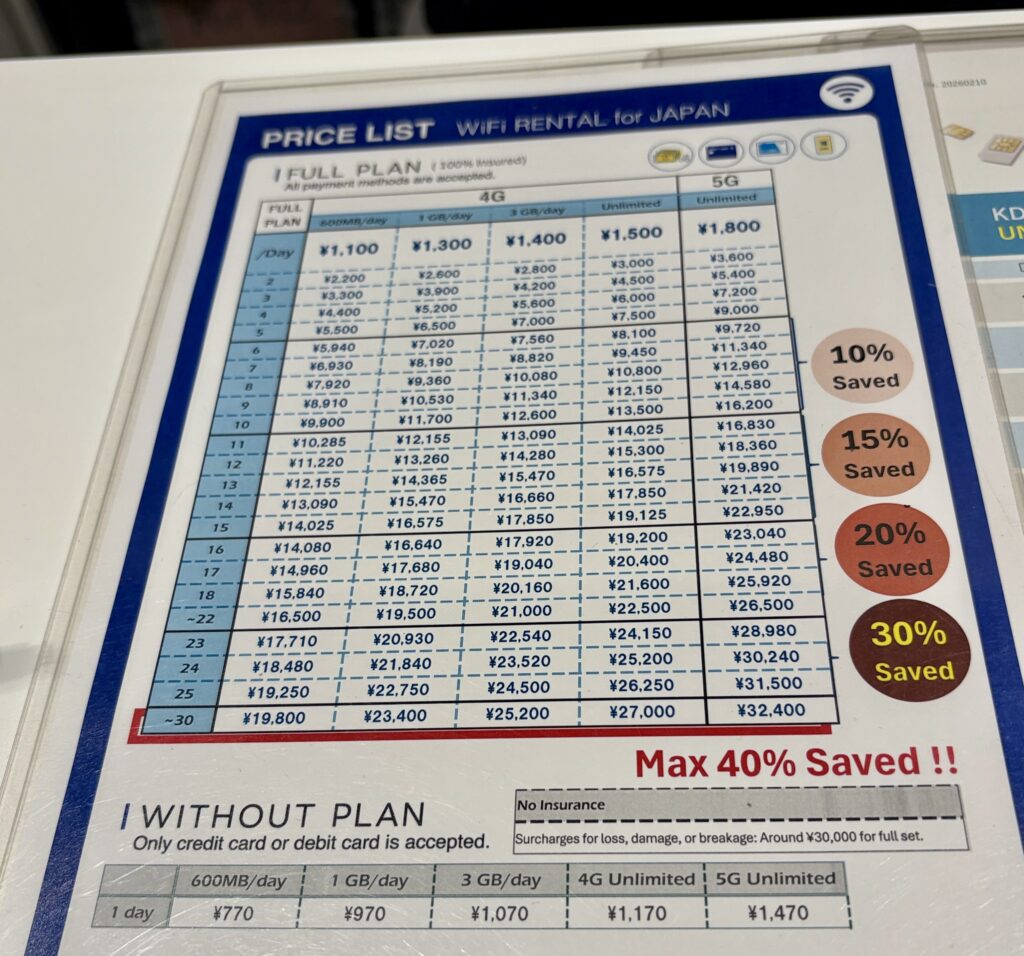
Prices as of April 2026 at Haneda Airport, Photo by Tokyo Becky
How much does a physical SIM card cost in Japan?
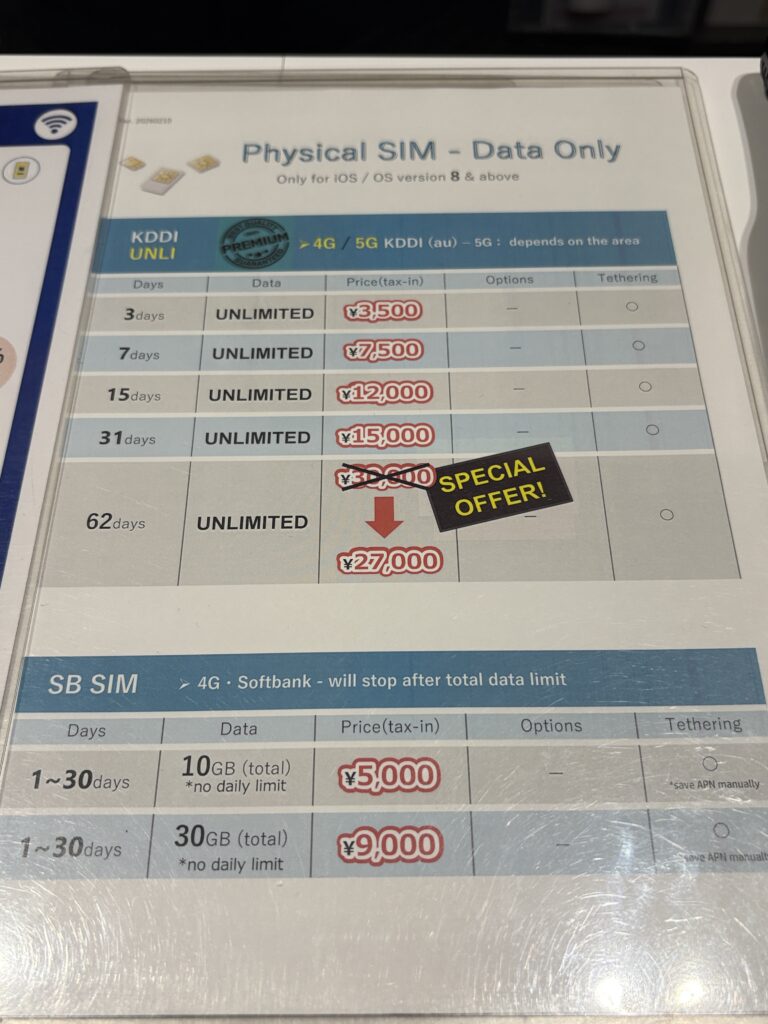
A physical SIM is the old-school approach: you pop your home SIM out and slot in a Japanese data SIM. It still has fans, but it means fiddling with a SIM tray at the airport, keeping your tiny home SIM safe for two weeks, and losing your home number while you travel. The counter at Haneda sells two families of data-only SIM, and they are iOS-friendly for recent operating systems. Of course, many phones no longer use physical SIMs so keep this in mind before you choose your SIM.
| Physical SIM | Data & duration | Price (tax in) | Network |
|---|---|---|---|
| KDDI UNLI | Unlimited / 3 days | ¥3,500 | 4G / 5G KDDI (au) |
| KDDI UNLI | Unlimited / 7 days | ¥7,500 | 4G / 5G KDDI (au) |
| KDDI UNLI | Unlimited / 15 days | ¥12,000 | 4G / 5G KDDI (au) |
| KDDI UNLI | Unlimited / 31 days | ¥15,000 | 4G / 5G KDDI (au) |
| KDDI UNLI | Unlimited / 62 days | ¥27,000 | Special offer, down from ~¥30,000 |
| SB SIM | 10 GB total / up to 30 days | ¥5,000 | 4G SoftBank, no daily limit |
| SB SIM | 30 GB total / up to 30 days | ¥9,000 | 4G SoftBank, no daily limit |
The KDDI unlimited SIMs are decent value if you want guaranteed unlimited data and do not mind swapping SIM trays. But notice that the eSIM kiosk a few steps away sells the same unlimited data for less, and an eSIM you ordered online costs less again, with none of the physical fuss.
How much does an airport eSIM kiosk cost (WorldWide eSIM at Haneda)?
This is the self-service tablet kiosk you will see at arrivals, branded WorldWide eSIM. You pick your country, choose a plan, pay by card, and scan a QR code on the spot. It is faster than the pocket WiFi line and there is nothing to return. The plans below are the Japan options I photographed on the kiosk in April 2026.
| Airport eSIM plan | Price | Approx. US$ |
|---|---|---|
| 3 GB / 1 day | ¥800 | ~US$5 |
| 10 GB / 3 days | ¥2,000 | ~US$13 |
| 10 GB / 7 days | ¥3,000 | ~US$20 |
| 15 GB / 7 days | ¥3,800 | ~US$25 |
| 20 GB / 15 days | ¥5,000 | ~US$33 |
| 15 GB / 30 days | ¥5,500 | ~US$37 |
| 30 GB / 30 days | ¥9,000 | ~US$60 |
| 5G Unlimited / 4 days | ¥4,000 | ~US$27 |
| 5G Unlimited / 7 days | ¥7,500 | ~US$50 |
| 5G Unlimited / 30 days | ¥15,000 | ~US$100 |
The kiosk also runs a few longer unlimited tiers in between, around ¥9,000 and ¥12,000. One detail worth knowing before you tap “buy”: the kiosk warns, in big orange letters, that your phone must be eSIM-compatible, eSIM-enabled, and SIM-unlocked, and that there are no refunds and no exchanges once you pay, used or not. There is no human standing there to fix it if your phone is locked, so check your device before you travel.
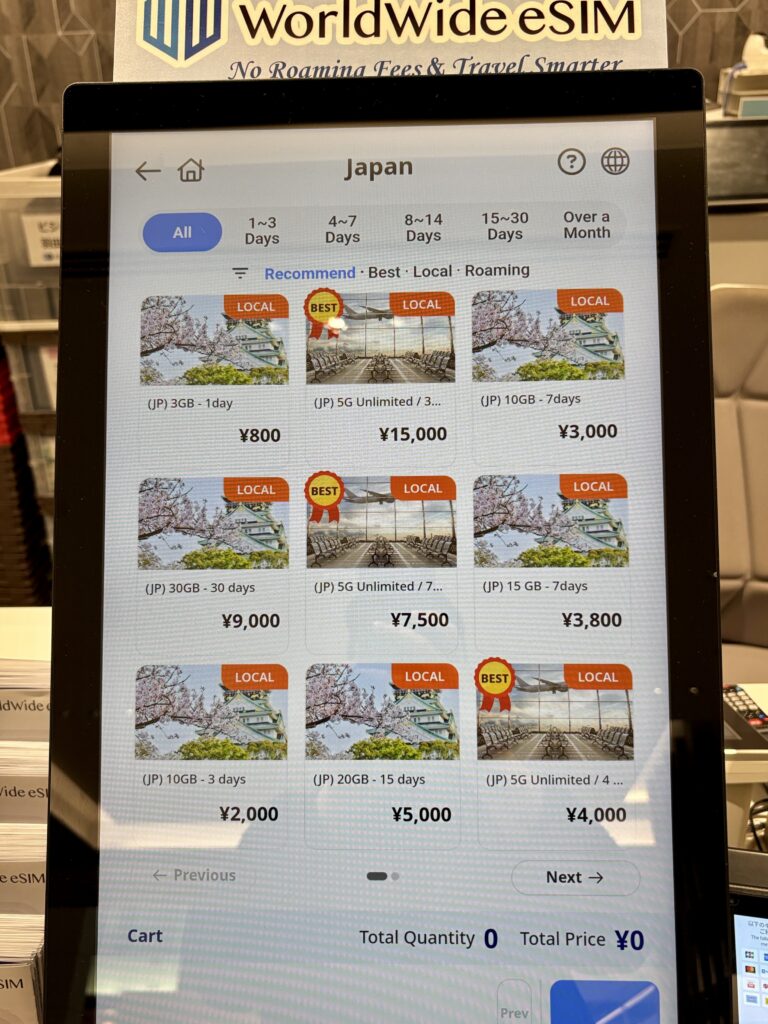
Comparing prices of eSIMs available at Haneda Airport, Photo by Tokyo Becky
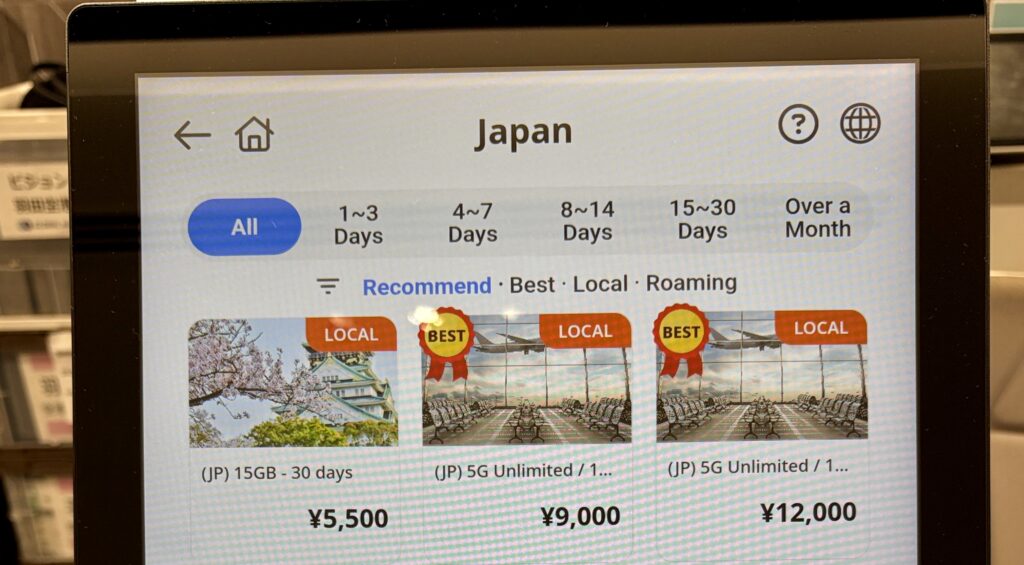
More eSIM options at Haneda Airport, Photo by Tokyo Becky
You will pay the prices above if you are already at the airport. However, you can order the same kind of eSIM online before you fly and you usually pay less, with no lines and zero risk of a locked phone leaving you stranded at arrivals. Saily plans for Japan start at US$3.99.
Is it cheaper to buy an eSIM before you fly?
Almost always, yes. A travel eSIM purchased in advance is the same technology as the kiosk eSIM, but it is purchased from a provider that competes on price online rather than charging an airport premium. It is also the only option that is already working before you have collected your bags. The one I keep coming back to is Saily, run by the team behind NordVPN, partly because the prices where cheaper than the airport and partly because the app is genuinely simple.
Here are Saily’s Japan plans in 2026, with an approximate yen figure so you can compare them directly with the airport boards above.
| Saily plan | Duration | Price | Approx. yen |
|---|---|---|---|
| 1 GB | 7 days | US$3.99 | ~¥600 |
| 3 GB | 30 days | US$7.99 | ~¥1,200 |
| 5 GB | 30 days | US$10.99 | ~¥1,650 |
| 10 GB | 30 days | US$17.99 | ~¥2,700 |
| 20 GB | 30 days | US$24.99 | ~¥3,750 |
| Unlimited (5 GB/day full speed) | 15 days | US$48.99 | ~¥7,300 |
Comparing the Saily prices with the costs at the airport, the amount of money you can save is obvious. A 15-day unlimited eSIM from Saily costs around ¥7,300, while the airport kiosk wants ¥12,000 for unlimited over the same time frame and pocket WiFi would run you well over ¥20,000. For a one to two week trip with normal use, the 5 GB or 10 GB Saily plan covers maps, translation, train apps, and social media for the price of a couple of conveyor-belt sushi plates. You also earn a small amount back in Saily credits, and the service holds a 4.7 rating across more than 97,000 reviews.
How do I set up a Saily eSIM for Japan?
The whole point of pre-ordering is that the hard part is done before you leave home. Here is the process, start to finish.
1. Choose a data plan for your trip
Select Japan as your destination and buy the plan that matches your trip length and data habits, then download the Saily app. If you are also hopping to Korea, Thailand, or elsewhere in the region, a regional Asia plan can cover several countries on one eSIM.
2. Install the eSIM and enable data roaming
Follow the in-app instructions to install the eSIM, then turn on data roaming for the Saily line in your phone settings. On an iPhone you do this under Settings, then Cellular, then add the eSIM and toggle roaming on for that line. Your home SIM stays in the phone, so you keep your own number for calls and texts.
3. Land and connect automatically
The plan activates automatically when you arrive in Japan. By the time you have walked from the gate to immigration, your data is live, your maps are loading, and you can request a taxi or check your hotel directions without ever visiting the connectivity counter.
What should I watch out for with a Japan eSIM?
A few honest caveats so you buy the right thing. First, an eSIM only works if your phone is eSIM-compatible and carrier-unlocked. Most recent iPhones, Pixels, and Samsung phones qualify, but a phone still locked to your home carrier does not, and that is exactly the trap the airport kiosk warns about with its no-refund policy.
Second, travel eSIMs are data-only. You will not get a Japanese phone number or traditional SMS, which is fine for almost everyone, since calls and messages run over WhatsApp, iMessage, LINE, and similar apps. Third, read what “unlimited” actually means: Saily’s unlimited plan gives 5 GB per day at full speed, after which the connection is slowed to around 1 Mbps for the rest of the day. That is still fine for maps and messaging, just not for heavy streaming once you pass the daily cap. A big tip to save on data is to close your Google Maps when you are not using it. You will be using Google Maps A LOT. If you are a big TikTok user, you may also want to download videos in advance so you can watch without connecting to data. There is free WiFi at many train stations and 7/11 shops, so you can connect to the internet if your phone data runs out.
So what is the best eSIM for Japan travel in 2026?
For the great majority of travelers, the best eSIM for Japan in 2026 is a travel eSIM ordered in advance, set up before you fly so it activates the moment you land. It is cheaper than the airport kiosk, far cheaper than pocket WiFi, and it removes the single biggest risk at arrivals: discovering your phone is locked while a no-refund kiosk shrugs at you.
Choose pocket WiFi only if you are traveling as a group sharing one connection, or if your phone genuinely cannot take an eSIM. Choose a physical airport SIM if you specifically want guaranteed unlimited data and do not mind swapping SIM cards. For everyone else, including every solo traveler I send to Japan, an eSIM you ordered online wins on price, speed, and peace of mind. I use Saily, plans start at US$3.99, and it is live before you have cleared immigration.
Once you have your phone data set and ready to go, you are ready to explore Shinjuku, Golden Gai, Kyoto, day trips from Osaka, and beyond! Enjoy your time in Japan!





0 Comments